How to join and install the Plany Timeline beta on Android
Plany Timeline is our biggest leap forward in AI-powered productivity, and it is rolling out through Google Play's official testing program. Here is the 3-step guide to becoming a beta tester and unlocking the new AI features today.
Before you start
To ensure absolute stability, the Plany Timeline beta is distributed via Google Play's official testing program. The whole process takes about two minutes and only needs to be done once.
Step 1: Join the Google Group (access authorization)
Your email must be registered on our authorization list first, otherwise the app will not be visible on the Play Store. To begin, join our official Google Group: Join the Plany Timeline Google Group

- Open the Plany Timeline Google Group link
- Make sure you are signed in with the Gmail account you use on your phone
- Click the blue Join group button
Step 2: Become an official beta tester
After joining the group, you must officially opt in to the testing program on the Google Play portal: Plany Google Play testing portal
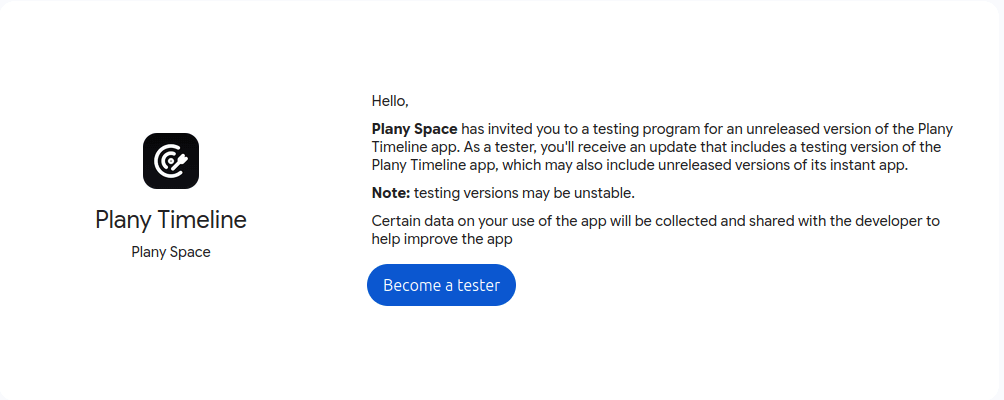
- Open the testing portal
- Click the Become a tester button
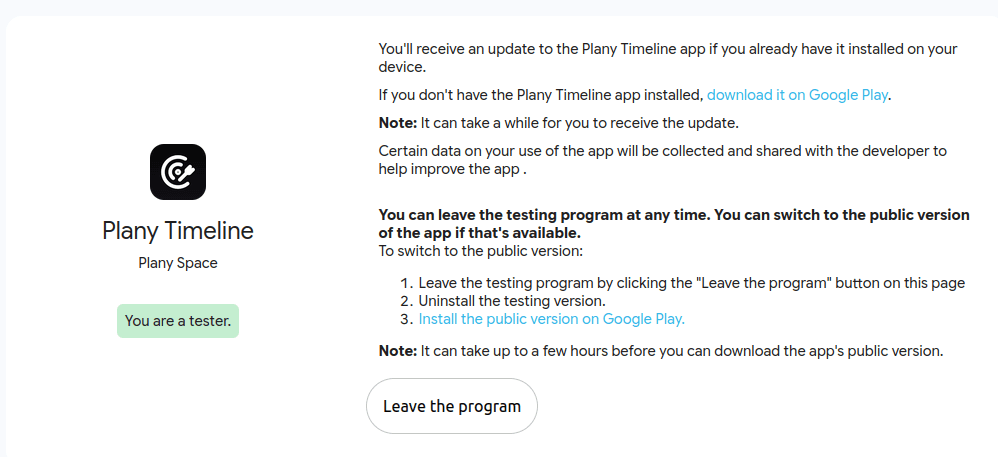
- You will see a confirmation message once you are successfully registered
Step 3: Download or update from the Play Store
Once you are registered as a tester, Google will display a confirmation screen. You have two options to download or update the app:
- Option A (direct from the Google web screen): click the inline blue link on the confirmation page that says “download it on Google Play” to open the build directly.
- Option B (direct link): head straight to the app listing here: Download Plany Timeline on Google Play
Troubleshooting
| Issue | Fix |
|---|---|
| App not visible on the Play Store | Confirm you joined the Google Group in Step 1 and that your browser and Play Store use the same Gmail account |
| “Become a tester” shows an authorization error | Join the Google Group first, wait 2–5 minutes, then refresh the testing portal |
| Update does not appear after opting in | Give Google a few minutes to sync, then reopen the Play Store listing or check for updates in Manage apps & device |
| Wrong Google account signed in | Sign out, sign back in with the Gmail account you used for the Google Group, and repeat Step 2 |
What's new inside this beta
- Advanced AI Timelines: smart planning features that automatically adapt and change based on your day.
- Daily Tasks feature: a fluid, streamlined interface built for tracking your routines and habits.
- Bug fixes & speed: core optimization tweaks to ensure a completely smooth experience without lag.
FAQ
Is the Plany Timeline beta free?
Yes. Joining the Google Group and the Play Store testing program is completely free.
Why can't I find Plany Timeline on the Play Store?
The beta build is only visible to authorized testers. Make sure you have joined the Google Group (Step 1) and opted in on the testing portal (Step 2) with the same Gmail account you use on the Play Store.
How long does it take for access to activate?
Usually instantly, but Google can take 2–5 minutes to sync your tester status. If the app still does not appear, refresh the page or reopen the Play Store.
How do I leave the beta program?
Open the testing portal link again and choose “Leave the program”. You can then uninstall the beta build and reinstall the public version from the Play Store.
We need your feedback
If you encounter any bugs during testing or have features you want to suggest, reach out to us directly through our community channels. Happy planning!